The past few months I have held full-day workshops in agentic engineering for hundreds of developers. And what strikes me every time is how little most people know about how AI models really work. And there’s a good reason for it. I still haven’t encountered any good management-level introduction videos that explain how these models work “under the hood”.
So if you haven’t visited any of my workshops, I figured I could spend this newsletter intro talking about context windows and parametric memory. Both key concepts for understanding how LLMs work.
Every time an AI model produces output, it can only use two sources of knowledge: the built-in parametric memory (knowledge compressed into its neural network weights during training) and something called the context window, which is where you send in information. The people that are best at prompting own the context window, and they know exactly what to put in the context window to get the AI model return back what they expect. Every time you send in a document or ask the AI model to search the web, it will add pieces from the document and things it finds on the web to the context window before it generates its response.
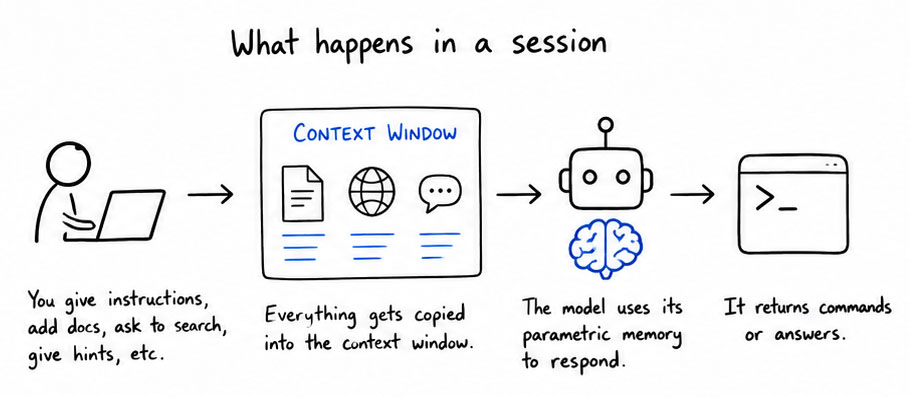
The trick to get good at prompting is to understand how this works in practice. When you start up a tool like Claude Code or Codex, it will automatically copy a system prompt into the context window. This system prompt typically defines how it should behave and respond. The rest is up to you. If you want to add a feature to a software program, you can describe the task and maybe give it some hints on where to look in the source code. This task will then be copied into the context window, sent to the AI model, which will use its parametric memory to respond back with a series of commands to execute on your computer to fill the context window with more details. The more precise you are the less information will be copied to the context window, the fewer token you will spend, and the more predictable the output will be.
This is then again sent to the AI model, which will send back more commands, to fill up as much of the memory with relevant information as possible to create the new feature. Once the model has gathered enough context it will start working.
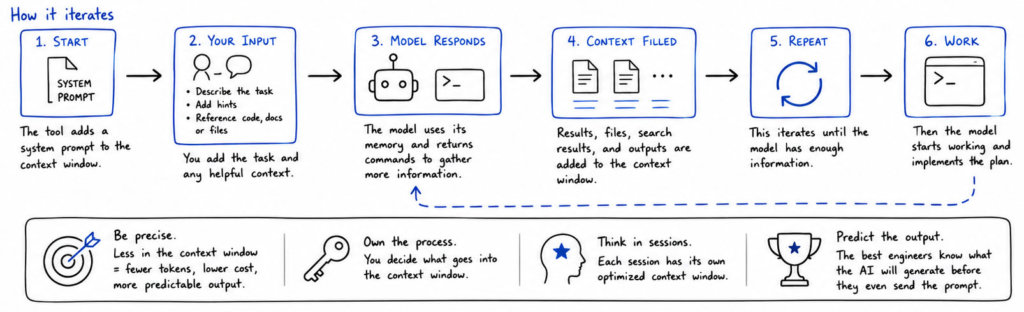
Once you learn how this works, and you start thinking in sessions where each session runs with its own optimized context window, this is when you can start getting really good at agentic engineering. When you own the process you are never surprised by an AI that didn’t deliver. The best agentic engineers know what the AI will generate before they have even sent the prompt. This is a skill that takes months to master, but it’s a very rewarding journey.
Thank you for being a Tech Insights subscriber!
Listen to Tech Insights on Spotify: Tech Insights 2026 Week 20 on Spotify
THIS WEEK’S NEWS:
- Google Ships On-Device AI Model to All Chrome Users
- Mozilla Fixes 423 Firefox Bugs in April Using Claude Mythos Preview
- OpenAI Adds Chrome Extension to Codex
- OpenAI Adds Three New Real-Time Voice Models
- Claude Managed Agents Gains Dreaming, Outcomes, and Multiagent Orchestration
- Anthropic Raises Claude Code Limits Following SpaceXAI Compute Deal
- Claude for Microsoft 365 Now Generally Available on All Paid Plans
- Spotify Lets AI Agents Save Personal Podcasts To Your Library
- ChatGPT Adds Opt-In “Trusted Contact” Safety Feature
- Subquadratic Announces SubQ, a 12M-Token Context Window AI Model
Google Ships On-Device AI Model to All Chrome Users
The News:
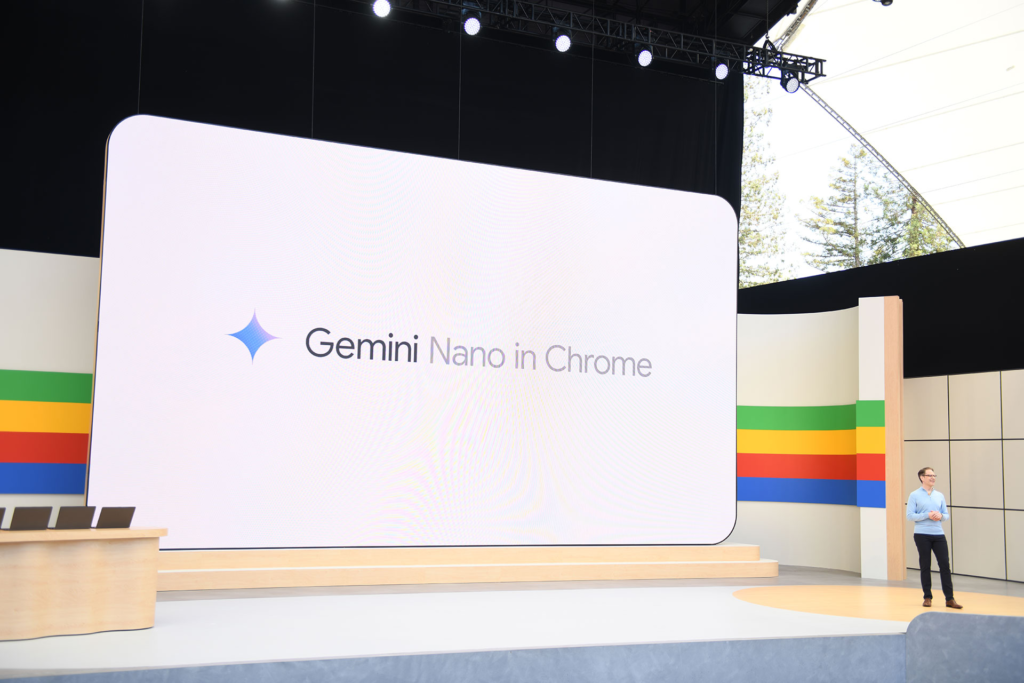
- Chrome 148, released May 5, ships with Prompt API, giving web pages JavaScript access to Gemini Nano, a 4.27 GB on-device language model that runs local inference without sending data to cloud servers.
- The API accepts natural language prompts directly from web pages and supports text generation, summarization, classification, image captioning, audio transcription, and information extraction from multimodal inputs.
- Google recommends having 22 GB of free disk space available to run the model, though Gemini Nano v3 itself is approximately 4.27 GB.
- Chrome installs the model without an explicit user prompt; users can check model status at chrome://on-device-internals and disable it under Settings > System.
- Using the Prompt API requires developers and users to accept Google’s Generative AI Prohibited Uses Policy, which bans activities beyond what is legally prohibited, including generating “disturbing” content.
My take: Just to make this clear: Google Chrome now ships with a 4GB built-in AI model, and it’s not even opt-in, it’s opt-out (and not very simple remove either). And the opposition has been massive. Mozilla rated the new Prompt API as “against” in its Standards Positions repository, with the main concern that prompts created by web pages will be tightly coupled to this specific model, which would pressure Apple and Mozilla to license Google’s Gemini Nano in order to deliver a consistent user experience.
“Part of working in the open is encouraging debate and disagreement. We welcome Mozilla’s feedback and will continue to collaborate with them and the web community as we work to improve the API.”
It’s easy to understand why Mozilla is against this, but when it comes to Apple they already have a deal signed with Google , so I would not be surprised to see Gemini Nano or an Apple-specific LLM being shipped as a core-component with the next Safari. Mozilla does not have that option, which is why I believe they have been the strongest opponent to this. Architecturally I would of course prefer to not have the LLM built into the browser, but for ease-of-use and to get traction maybe this was the right thing to do. What do you think?
Read more:
- Mozilla pushes back against Google’s Prompt API
- Google is building Gemini Nano AI right into Chrome | The Verge
- Google tweaks Chrome AI privacy wording, insists processing stays on-device
- How to delete Chrome’s weights.bin file and disable Gemini Nano
Mozilla Fixes 423 Firefox Bugs in April Using Claude Mythos Preview
https://hacks.mozilla.org/2026/05/behind-the-scenes-hardening-firefox/
The News:
- Mozilla used Anthropic’s Claude Mythos Preview to identify and fix security vulnerabilities in Firefox at scale, patching 423 security bugs in April, including 271 attributed to Claude Mythos Preview in Firefox 150.
- Of the 271 bugs, 180 were rated sec-high, 80 sec-moderate, and 11 sec-low. Mozilla defines sec-high as bugs triggerable by normal user behavior, such as browsing to a web page.
- Mozilla built an agent-based harness on top of its existing fuzzing infrastructure, running jobs in parallel across ephemeral VMs, each tasked to hunt for bugs within a specific target file and write findings back to a bucket.
- The harness creates and runs reproducible test cases to dynamically verify whether a crash occurs, filtering out speculative reports that earlier static analysis approaches could not resolve.
- The bugs spanned JIT, WebAssembly GC, IndexedDB, WebTransport, XSLT, HTML tables, and RLBox, including a 15-year-old bug in the <legend> element and a 20-year-old XSLT hash table vulnerability.
- The model repeatedly attempted sandbox escapes via prototype pollution and was blocked each time, because Mozilla had previously frozen those prototypes by default.
My take: Wow, just look at that graph. Out of the 271 Claude Mythos-attributed bugs found, 180 were rated high risk. The way Claude Mythos found the issues was that it wrote and ran custom test cases to confirm the actual issues, rather than just reading the code statically. This report also strengthens the use of AI for quality improvements and not just performance improvements. If you work with software development and do not have AI agents within your pipeline yet, maybe this report will make you reconsider. My own experience having AI write all the tests have been nothing short of phenomenal, and I doubt anyone will miss the work of writing unit-tests by hand going forward.
OpenAI Adds Chrome Extension to Codex
https://twitter.com/OpenAI/status/2052480800004956323
The News:
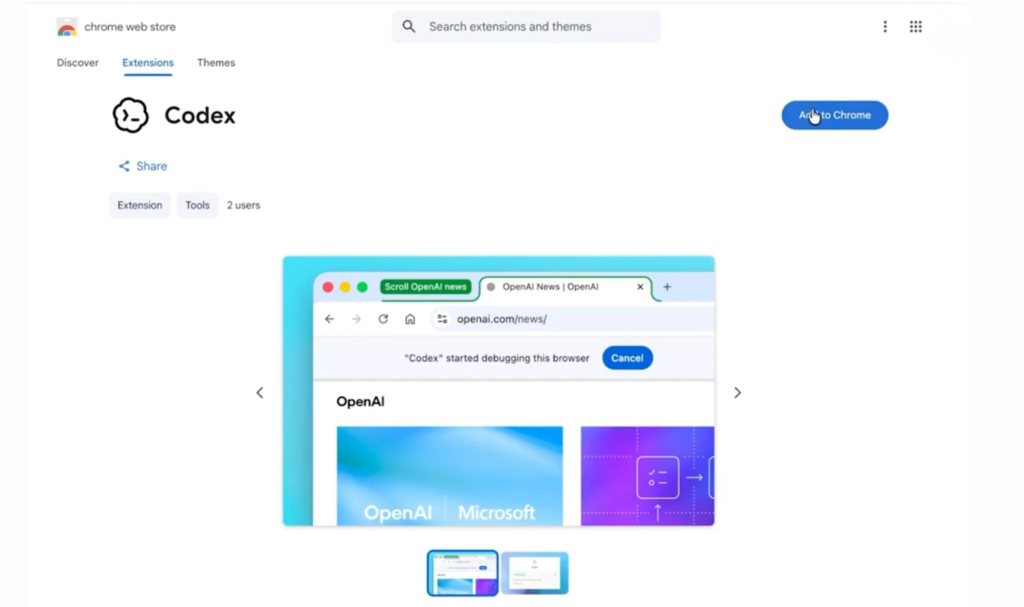
- OpenAI released a Chrome extension for Codex on May 7, available on macOS and Windows for all regions except the EU and UK, with those regions listed as coming soon.
- The extension installs via the Plugins menu inside the Codex app and connects to the user’s existing Chrome profile, accessing the same session, cookies, signed-in apps, and open tabs.
- Codex operates in task-specific tab groups in the background, so it does not take over the user’s active browser session while working.
- It can run parallel browser tasks across multiple tabs simultaneously, which was not possible with the previous Computer Use integration that required taking over the entire browser window.
- Under the hood, the extension uses code execution rather than a screenshot-reason-mouse-click loop, so Codex scripts navigation directly through Chrome DevTools to inspect page structure, network responses, and console errors.
- Use cases include testing web apps, data entry flows, CRM updates, dashboard checks, and research across sites where the user is already logged in.
My take: Since this extension do not depend on screenshots, it is fast. If you are using Codex to develop web pages it’s a complete game changer. My predictions going forward? 1. I think OpenAI will soon announce that they have discontinued their Atlas browser (which was first launched in October last year, last update to it was in March 10). 2. I also predict OpenAI will soon launch their mobile Codex app with remote control, which means that the next logical thing to do is to 3. over time abandon and phase out the regular “ChatGPT” app for desktop and mobile. The use cases for GPT-5.5 through Codex are so much more than just chat, which makes Codex a much better platform for the future than the native and difficult to improve ChatGPT apps.
Read more:
OpenAI Adds Three New Real-Time Voice Models
https://openai.com/index/advancing-voice-intelligence-with-new-models-in-the-api

The News:
- OpenAI released three new real-time voice models on May 7 via the Realtime API: GPT-Realtime-2, GPT-Realtime-Translate, and GPT-Realtime-Whisper.
- GPT-Realtime-2 replaces GPT-Realtime-1.5 and incorporates GPT-5-class reasoning with five configurable effort levels (minimal, low, medium, high, and xhigh), a 128K context window (up from 32K), parallel tool calling, and image input support.
- On the Big Bench Audio benchmark at high reasoning, GPT-Realtime-2 scored 96.6% versus 81.4% for GPT-Realtime-1.5; on the Audio MultiChallenge benchmark, it scored 48.5% versus 34.7%. The default production setting is “low” reasoning, so real-world performance will differ from these headline numbers.
- GPT-Realtime-Translate handles real-time spoken translation across more than 70 input languages and 13 output languages, billed at $0.034 per minute.
- GPT-Realtime-Whisper provides live streaming speech-to-text transcription, billed at $0.017 per minute.
- GPT-Realtime-2 is billed by token consumption: $32 per million audio input tokens and $64 per million audio output tokens. Text tokens are billed separately at $4 per million input and $24 per million output, up from $16 per million output for GPT-Realtime-1.5.
“In testing for Fin Voice, GPT-Realtime-2 asked better follow-up questions, handled domain-specific details more reliably, and felt like a step change for real customer conversations.” Brian Donohue, VP of Product at Intercom
My take: These new models are a major improvement in quality, but at a cost. GPT-Realtime-2 raises the price for output text tokens by 50%, from $16 to $24 for for 1M tokens. And since GPT-5 consumes more tokens through more advanced reasoning, this upgrade could be costly you if you run a large-scale call center agent. But the quality of GPT-Realtime-2 is really something else, it’s very natural sounding. If you have a minute, go to their web site and search for “The magic of GPT‑Realtime‑2” and listen to the five examples. This is truly next-level voice assistants.
Claude Managed Agents Gains Dreaming, Outcomes, and Multiagent Orchestration
https://claude.com/blog/new-in-claude-managed-agents
The News:
- Anthropic added four new capabilities to Claude Managed Agents on May 6, 2026, at its Code with Claude developer conference: dreaming (research preview), outcomes, multiagent orchestration, and webhooks (all three in public beta).
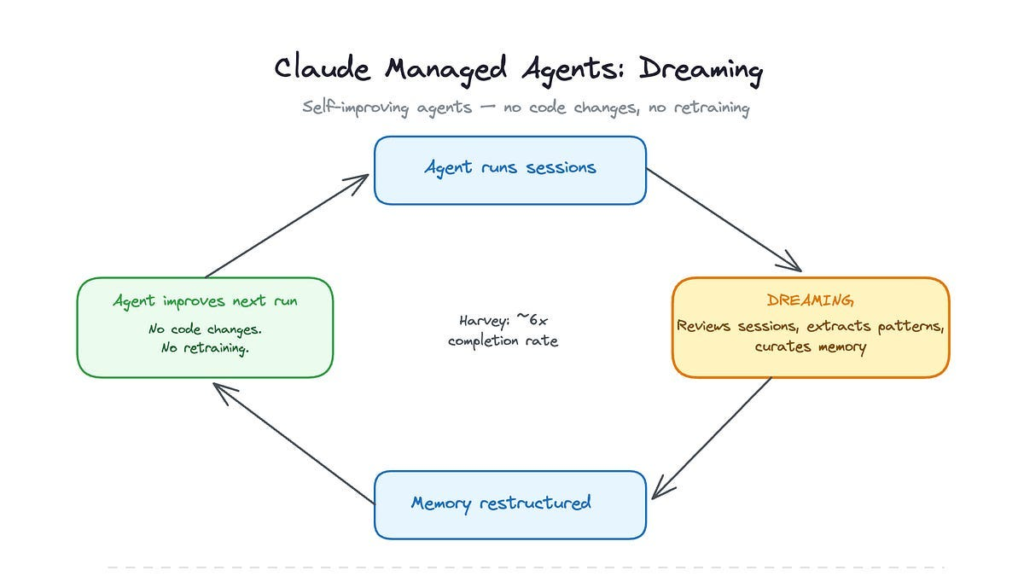
- Dreaming is a scheduled background process that reviews past agent sessions and memory stores, extracts patterns such as recurring mistakes and converging workflows, and curates a consolidated memory store for future sessions. Developers choose whether memory updates apply automatically or require manual approval before taking effect.
- Outcomes lets developers write a rubric describing what a successful result looks like. A separate grader agent evaluates each output in its own context window, isolated from the primary agent’s reasoning, and sends the agent back to revise until the output meets the criteria. In internal benchmarks, outcomes improved task success rates by up to 10 points over a standard prompting loop, with specific gains of +8.4% on .docx generation and +10.1% on .pptx generation.
- Multiagent orchestration allows a lead agent to break a job into pieces and delegate each to specialist subagents with their own model, prompt, and tools, running in parallel on a shared filesystem. The coordinator is limited to one level of delegation and a maximum of 20 unique agents.
- Webhooks let developers subscribe to HTTPS callbacks when a long-running session or outcome finishes, removing the need to poll for status.
My take: Claude Managed Agents launched in public beta in April 2026 as a hosted alternative to self-managed agent frameworks such as LangGraph, AutoGen, or OpenAI’s Agents SDK. Anthropic handles the infrastructure, session persistence, sandboxing, tool execution, while you as a developer configure agents through the Claude Console or API. Pricing is $0.08 per hour plus token usage.
Dreaming is a new feature that goes through all previous sessions and extracts useful patterns so the agent don’t have to do the same mistake twice. This is one of those features that I would have been sceptical about six months ago, but so far the results from dreaming has been phenomenal. Harvey reported 6x improvement in task completion rates, and Wisedocs report a 50% reduction in document review time. As usual, if you are an EU company you might want to hold out on this one, since all data is stored in the US.
Anthropic Raises Claude Code Limits Following SpaceXAI Compute Deal
https://www.anthropic.com/news/higher-limits-spacex
The News:
- Anthropic signed a compute agreement with SpaceXAI (formerly xAI, now part of SpaceX) to use all capacity at the Colossus 1 data center in Memphis, Tennessee, and immediately raised usage limits for paid Claude subscribers.
- Anthropic doubled Claude Code’s five-hour rate limits for Pro, Max, Team, and seat-based Enterprise plans.
- Peak-hour limit reductions on Claude Code are removed for Pro and Max accounts.
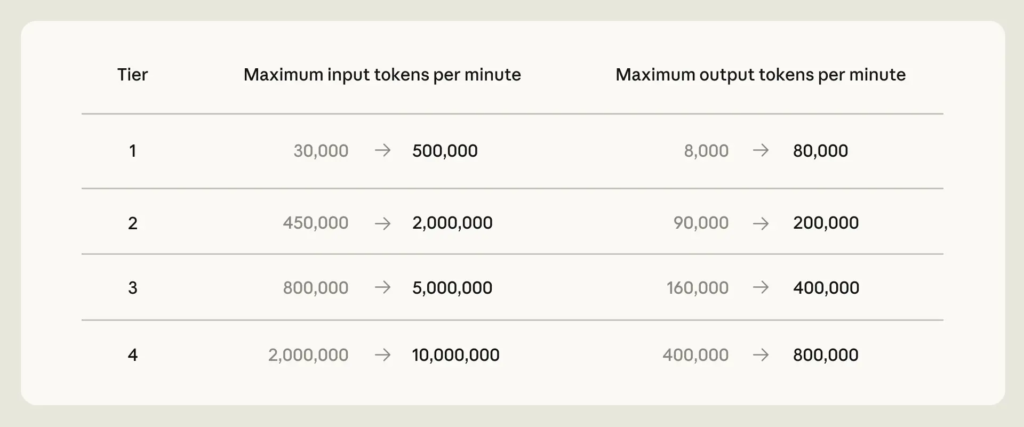
- API rate limits for Claude Opus models are raised across all tiers. Tier 1 input tokens per minute increase from 30,000 to 500,000; output tokens per minute from 8,000 to 80,000. Tier 4 input tokens per minute increase from 2,000,000 to 10,000,000.
- The deal provides access to over 300 megawatts of capacity and more than 220,000 NVIDIA GPUs within the month. Anthropic also expressed interest in partnering with SpaceXAI to develop multiple gigawatts of orbital AI compute capacity.
- Anthropic noted that this deal supplements a broader set of signed infrastructure agreements, including up to 5 GW with Amazon, a deal with Google and Broadcom, and capacity arrangements with Microsoft and NVIDIA.
My take: Last month OpenAI announced that they have brought over 3GW of computer power online in just the three months, and this month Anthropic is bringing 0.3GW of power online in collaboration with SpaceXAI. And simply by doing that they are able to remove peak-hour limits and double the five-hour rate limit. I think this shows just how GPU-limited Anthropic are, and also the massive size difference between OpenAI and Anthropic infrastructure clusters.
So why did SpaceXAI give away all their capacity at Colossus 1? Well, in January 2026 Anthropic shut off access for xAI to Claude Opus, after it became clear that xAI used Claude internally for all software development. Anthropic’s terms of service explicitly prohibit using its models to build competing AI products. Tony Wu (co-founder of xAI) then wrote: “We will get a hit on productivity, but it rly pushes us to develop our own coding product / models”. Two months later, in March, Elon Musk added:
“xAI will catch up this year and then exceed them all by such a long distance in 3 years that you will need the James Webb telescope to see who is in second place”. Elon Musk, March 14
Well here we are now, two months later, and xAI is still very far from catching up with Anthropic and OpenAI. Grok 4.3 is still not good at tool use and software development, so I am just guessing that SpaceXAI is back to using Claude thanks to this deal and hopefully this will make them exceed all the others by such a long margin in 3 years.
Claude for Microsoft 365 Now Generally Available on All Paid Plans
https://claude.com/claude-for-microsoft-365
The News:
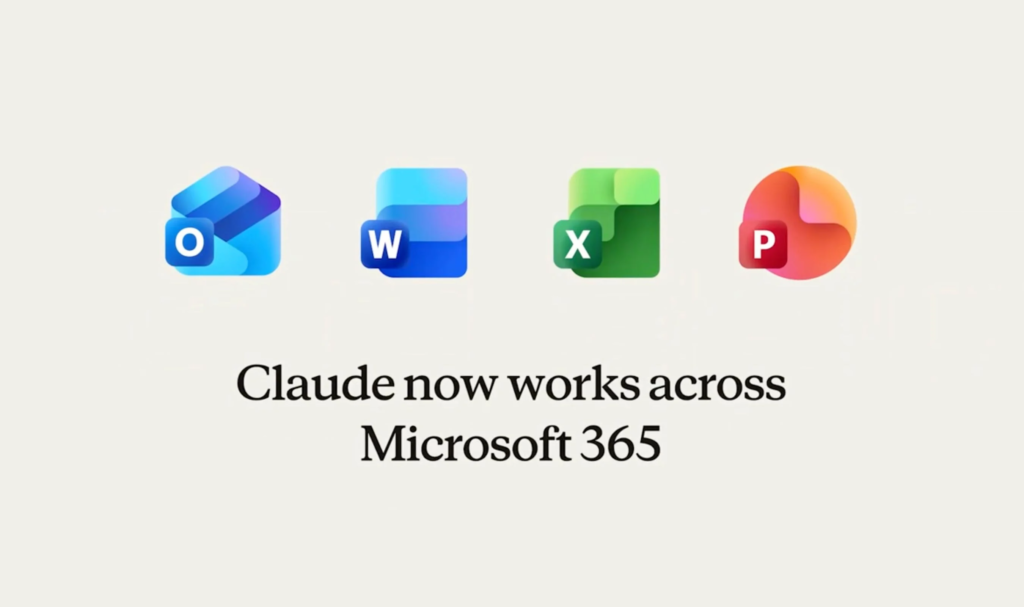
- Anthropic announced on May 7 that Claude for Excel, PowerPoint, and Word is generally available on all paid Claude plans on Mac and Windows, with Claude for Outlook entering public beta on all paid plans.
- Claude runs as a sidebar add-in inside each Office application and carries context across all four apps, so a workflow started in Outlook can continue into Word, then Excel, then PowerPoint without restarting the conversation.
- In Excel, Claude reads cell dependencies, updates assumptions without breaking existing formulas, and builds multi-sheet models from natural language descriptions.
- In Word, Claude edits using tracked changes, responds to comment threads, and applies existing heading styles, numbering, and table formats.
- In PowerPoint, Claude generates slides using the file’s existing slide masters and templates, and populates native charts from data in open Excel files.
- In Outlook (beta), Claude triages the inbox, drafts replies that sit in the native compose window waiting for the user to click send, and finds available time across calendars.
- The add-ins are available through Microsoft AppSource and support deployment via Amazon Bedrock, Google Cloud Vertex AI, and Microsoft Foundry.
My take: Microsoft is clearly in a difficult situation here. When a user signs up for Claude subscription they get the Claude apps, the Claude Code terminal app, and now also Claude for Microsoft 365, including Outlook. While Microsoft has a similar offering with M365 Copilot (still lacks something similar to Claude Code), Microsoft still needs to pay Anthropic for API access, which in practice means that you will always get less value for your AI money from Microsoft than you will get from Anthropic, at least until Microsoft can switch over to their on MAI language model (which is still way behind in performance).
For many EU companies though, signing up for an Anthropic subscription and letting it get full access to your Outlook is not an option due to GPDR regulations. Anthropic does not offer EU processing even for enterprise customers. If you need an AI to interact with your email or GDPR-classified data you still need to use Microsoft Copilot with EU processing or an OpenAI enterprise agreement.
Spotify Lets AI Agents Save Personal Podcasts To Your Library
https://newsroom.spotify.com/2026-05-07/personal-podcasts-launch

The News:
- Spotify introduced Personal Podcasts, a way for AI agents to generate private audio briefings and save them directly into a dedicated Personal Podcast section in a user’s Spotify library, available to eligible Free and Premium users globally while in beta.
- Users install Spotify’s Save to Spotify CLI tool from GitHub on desktop, sign in via a browser, then ask supported AI agents such as OpenClaw, Claude Code, or OpenAI Codex to create and save an audio file.
- Agents can draw on sources like class notes, online documents, local files, and calendar information to generate content, for example a pre‑exam summary of study notes or a weekly agenda briefing.
- Saved episodes appear under Personal Podcast in the Spotify library alongside music, playlists, and traditional podcasts, and they are private to the account, not publicly listed or searchable by other users.
- The Save to Spotify CLI and Personal Podcasts feature are in beta with usage limits, and Spotify positions this as infrastructure for existing agentic tools rather than an AI model or voice system of its own.
My take: You have heard me rant about CLI tools a lot the past weeks on this blog, and this time it’s time for Spotify to ship their “Save to Spotify” CLI tool, which you can download from GitHub. This tool does not generate audio files, it’s just a way for AI agents to automatically upload generated audio files straight into your Spotify account. A typical use case is having an agent scan the latest personalized news every morning, create a podcast from it, and finally upload the podcast straight to your Spotify account so you can listen to it on your way to work.
Read more:
ChatGPT Adds Opt-In “Trusted Contact” Safety Feature
https://openai.com/index/introducing-trusted-contact-in-chatgpt
The News:
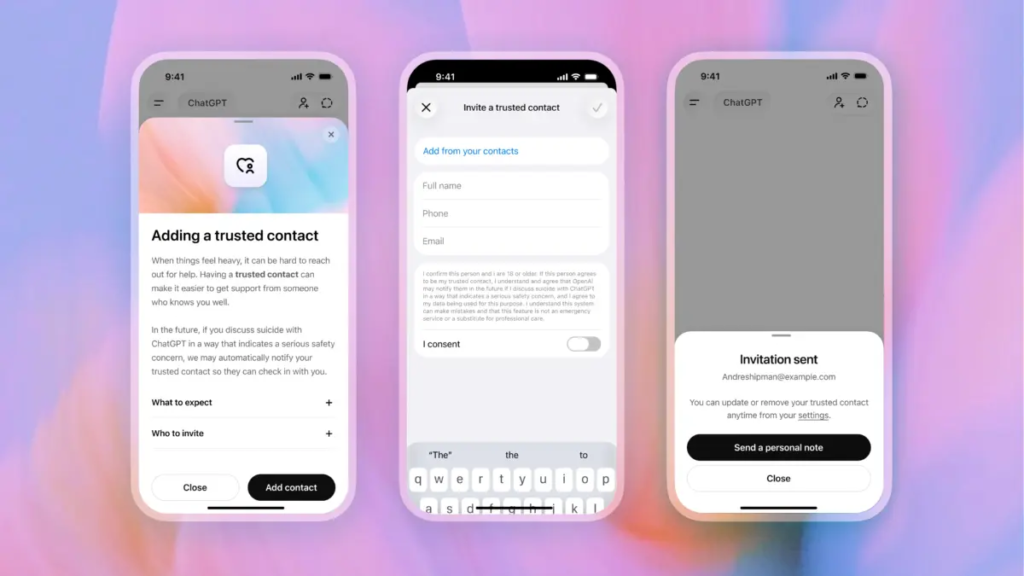
- OpenAI launched Trusted Contact, an opt-in feature in ChatGPT that notifies a user-designated adult if trained reviewers confirm a serious self-harm risk in a conversation.
- Users add one trusted adult (18+ globally, 19+ in South Korea) via ChatGPT Settings. The nominated person must accept an invitation within one week for the feature to activate; if they decline, the user may nominate a different adult. The trusted contact does not need a ChatGPT account.
- Detection works in two layers: automated monitoring flags concerning conversations, then a trained safety review team assesses the situation before any notification is sent. OpenAI states it aims to complete these reviews within one hour.
- If reviewers confirm a serious concern, the trusted contact receives a brief notification by email, text message, or in-app alert. The notification explains why self-harm was flagged, encourages checking in with the user, and provides a link to expert guidance. Chat details and transcripts are not shared.
- The feature was developed with input from OpenAI’s Global Physicians Network (260+ licensed doctors across 60 countries), its Expert Council on Well-Being and AI, and the American Psychological Association.
- The rollout is gradual. The feature is not available on ChatGPT Business, Enterprise, or Edu accounts.
My take: OpenAI recently faced a wave of lawsuits from families of people who have committed suicide after talking with ChatGPT. In a number of cases, the families say ChatGPT encouraged their loved one to kill themselves, or even helped them plan it out. Without an agentic verification layer, Large Language Models can always be tricked into saying things they should not say. With ChatGPT Trusted Contact every flagged incident will be reviewed by a human, and OpenAI strives to review all safety notifications within an hour.
Read more:
- OpenAI introduces new ‘Trusted Contact’ safeguard for cases of possible self-harm | TechCrunch
- ChatGPT told them they were special — their families say it led to tragedy | TechCrunch
- ChatGPT encouraged college graduate to commit suicide, family claims in lawsuit against OpenAI | CNN
- The family of teenager who died by suicide alleges OpenAI’s ChatGPT is to blame
Subquadratic Announces SubQ, a 12M-Token Context Window AI Model
https://thenewstack.io/subquadratic-12-million-context-window
The News:
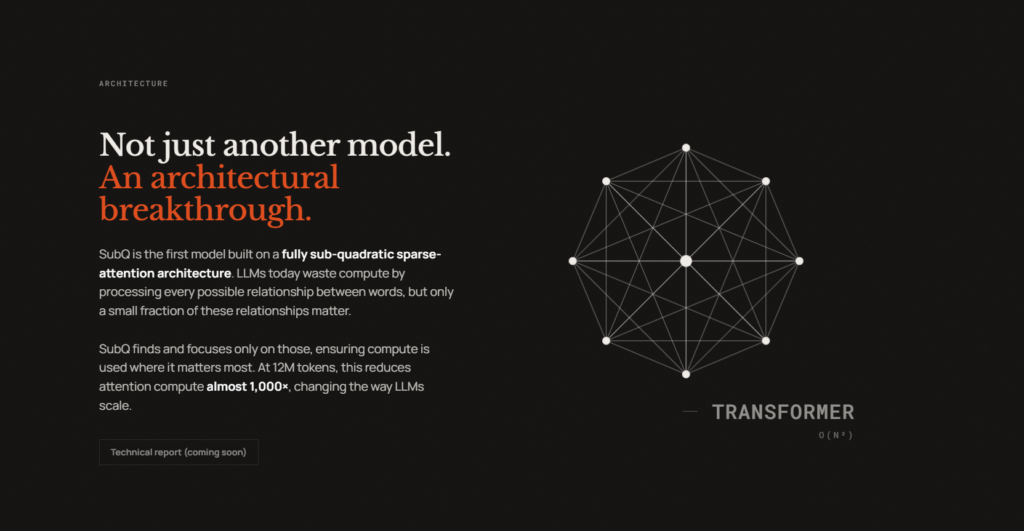
- Subquadratic, a Miami-based AI startup, launched SubQ 1M-Preview, the first production model built on a fully subquadratic sparse attention architecture called SSA (Subquadratic Selective Attention), which scales linearly rather than quadratically with context length.
- Standard transformer models use dense attention where compute scales quadratically with input length. SSA identifies relevant token relationships and skips others, delivering reported wall-clock prefill speedups on NVIDIA B200s of 7.2x at 128K tokens, 23x at 512K tokens, and 52.2x at 1M tokens compared to dense FlashAttention.
- The production model, SubQ 1M-Preview, achieved third-party verified scores of 65.9% on MRCR v2 (vs. GPT-5.5’s 74%, Claude Opus 4.7’s 32.2%, and Gemini 3.1 Pro’s 26.3%) and 95% on the RULER 128K benchmark at a reported cost of $8 per run, compared to roughly $2,600 for Claude Opus 4.6 on the same test.
- A separate research configuration, not the publicly available model, was run at 12 million tokens, achieving 92.1% on needle-in-a-haystack retrieval and 83% on MRCR v2. Subquadratic has not released a technical paper or model weights; the company’s site notes “paper coming soon.”
- The company launched a public API for SubQ 1M-Preview and a CLI coding agent called SubQ Code. A 50M-token context window is targeted for Q4 2026. The model is closed-weight and not available for open access.
My take: MRCR v2 is a benchmark that uses 8 needle items to retrieve items from long contexts. It “tests models’ ability to simultaneously track and reason about multiple pieces of information across extended conversations”. If you ever told an AI model several things it should remember, then asked it to reason about it, and it forgot many items and it felt stupid, then you know what this test is about. The 1M context version of SubQ achieves 65.9% on the MRCR v2 benchmark which is lower than GPT-5.5 with 74%, but much than Opus 4.7 and Gemini 3.1. But Subquadratic says they have a 12M model internally that perform even better than GPT-5.5 at 83% on MRCR v2, but at this point I have learnt to be quite skeptical about these promises based on unreleased models. Still, if SSA works as well that they say it does, we might see it in other models soon as well. And a 12M to 50M token context window would truly raise things to a whole new level, at least as long as it doesn’t forget what you put in there.
Read more: